
Observation Notes
You can take notes while observing both a live session and past session recordings. Notes include the following features:
- Tag with a timestamp
- Add bookmarks for Glows & Grows
- Associate with a Quality Tutoring Framework skill
- Select a Session to Observe:
- Live Session: On either the Dashboard or the Current Sessions page, click the Observe icon to join a current session as an Observer
- Past Session: On the Past Sessions page, click the camera icon next to Observe to review a past session the session you wish to review.
- Take Notes:
- The notes tool is displayed on the left-hand side of the recording interface.
- Take notes as you watch the recording.
- Hit enter/return to save the note
-
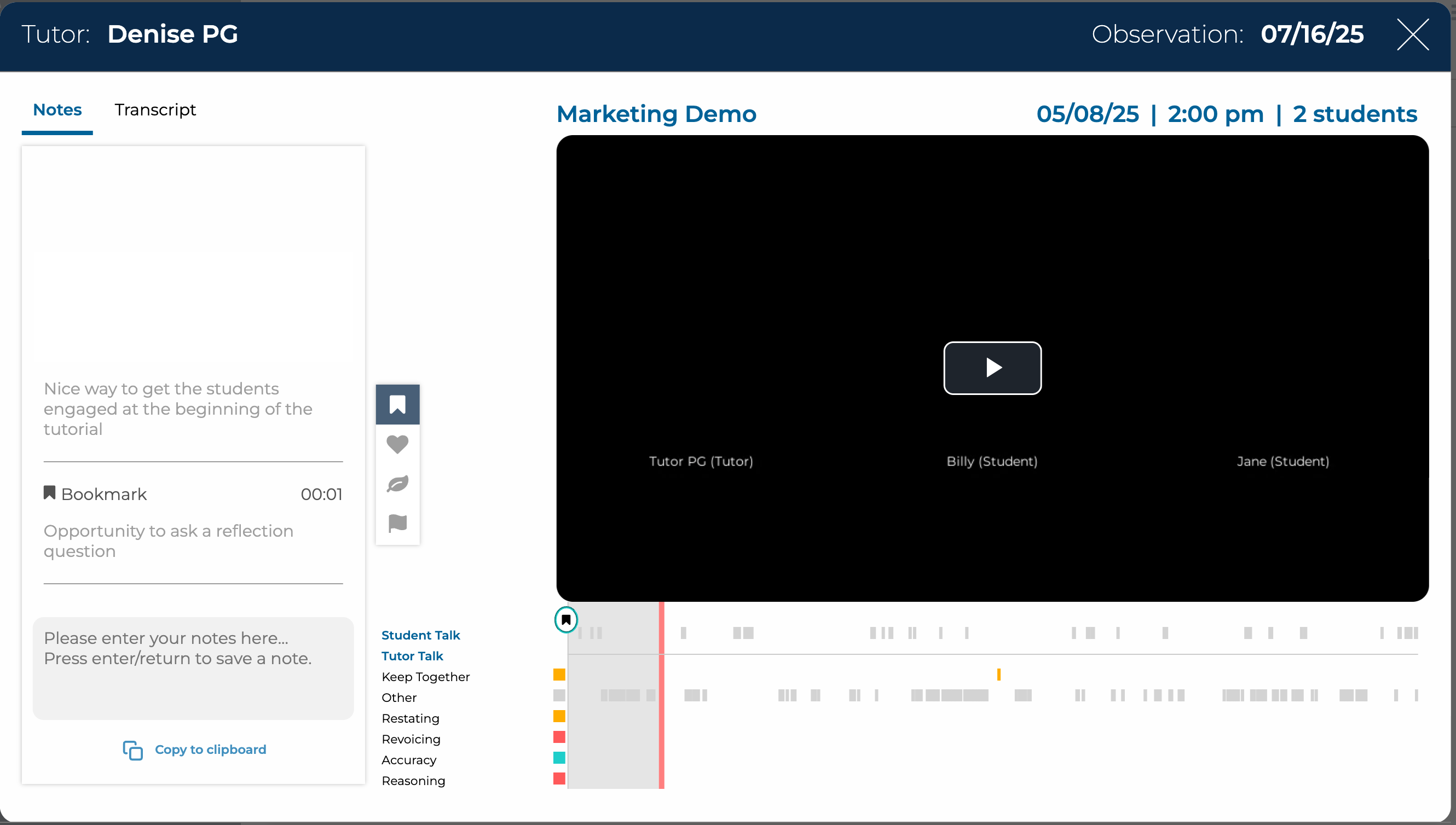
Past Session Viewer with notes panel on the left
- Bookmark Tags for Notes:
- Three bookmarks are available to tag notes:
- Bookmark: Marks the time when taking notes.
- Glow: Marks a time where exemplary skills were exhibited.
- Grow: Marks a time where room for growth is identified.
- Three bookmarks are available to tag notes:
- Quality Tutoring Framework Notes (NEW):
- You can also take notes for each of the Quality Tutoring Framework (QTF) skills
- Click any skill to open a note box
Additionally, you can add notes through the QTF Evaluation form.
